01 · Family content
Parent-child creators
Build recurring bedtime, growth, and shared-reading series.
 Blubo AI
AI picture book stories · parent-child content
Shape characters, plots, and learning themes into reviewable scripts, connected scenes, voiceover, and subtitles for a repeatable family-content workflow.
Platform names are descriptive only and do not imply partnership, endorsement, certification, or privileged access.

Who it is for
Organize themes, characters, and learning goals into a structure that teams can review and refine.
01 · Family contentBuild recurring bedtime, growth, and shared-reading series.
 02 · Education
Turn lesson themes or reading material into approachable story videos.
 03 · Publishing
Plan character continuity, scene transitions, and narration from licensed material.
 04 · Original IP
Create a consistent visual direction and reusable storyboard structure for original characters.
Five-step workflow
Each stage keeps room for human review of narrative, visuals, voice, rights, and platform format.
 STEP 01
Enter the theme, audience age, characters, and intended takeaway.
 STEP 02
Structure the opening, challenge, turn, and ending into short reviewable beats.
 STEP 03
Plan character continuity, space, camera focus, and picture-book atmosphere.
 STEP 04
Match narration, dialogue, and subtitle rhythm, then complete editorial review.
 STEP 05
Prepare aspect-ratio and duration variants and check current platform rules before publishing.
Scenes and storyboard
Use one main poster and five storyboard beats to align the visual arc from opening to close.
Examples and visuals illustrate the workflow and art direction only. Actual output depends on source material, model settings, human review, and current platform rules; BluboAI does not guarantee platform recommendation, views, follower growth, conversion, approval, or publishing results.
Content directions
Adjust each direction for rights, audience age, and the team's editorial standards.
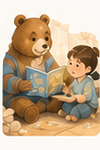
Pair gentle narration with clear scenes for shared family viewing.
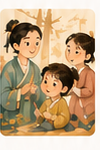
Explore sharing, courage, rules, and curiosity in a consistent series.

Extend authorized picture-book characters and plots into video storyboards.
FAQ
Yes. Audience age, character notes, the intended takeaway, and target duration help create a clearer structure.
Yes. Review characters, settings, shots, and subtitles before use, including continuity, accuracy, and rights.
The workflow can prepare ratio, duration, and subtitle variants, but publishing still depends on current platform rules and account permissions.
Only use text, characters, images, voices, and brand material that you own or are authorized to use.
Content concept demo
Share a basic direction so the team can assess structure, visual format, and required source material. A request does not guarantee acceptance, delivery, or a specific result.